 Lauper Labs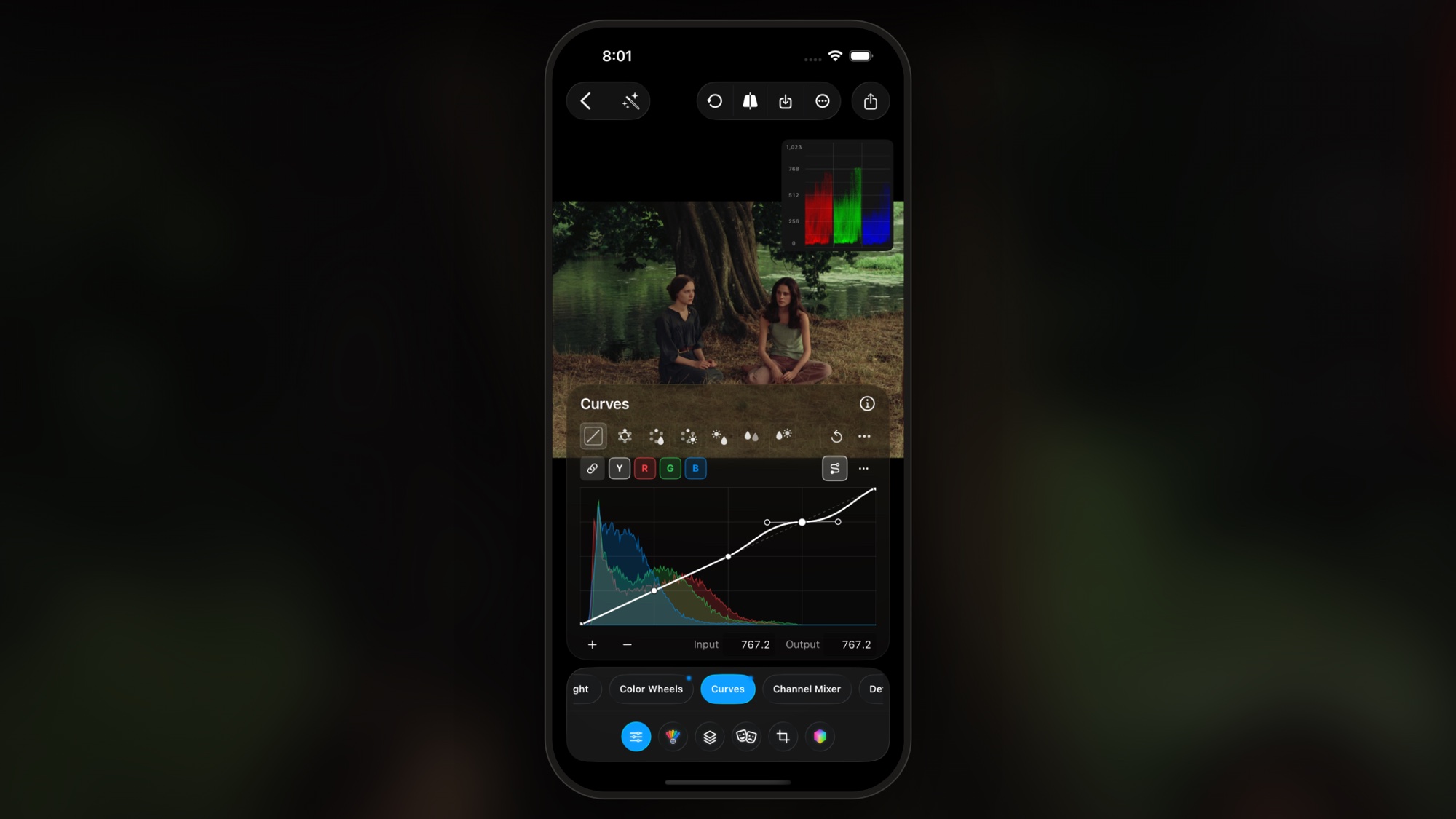

PeekLUT
Color grading for iPhone and iPad

There is no DaVinci Resolve app for iPhone. Blackmagic Design makes Resolve for Mac, Windows, Linux, and iPad, and the iPad version will not install on a phone. If you want Resolve-style color grading on an iPhone, you need a different app. This guide explains what is and is not available, shows how to get the same kind of grade with PeekLUT, and compares it with the three apps people most often try instead: Lightroom, VN, and CapCut.
We are Lauper Labs, the team behind PeekLUT, so read the comparison with that in mind. Every claim about another app below comes from its own documentation or App Store listing.
The short answer
- Is DaVinci Resolve on iPhone? No. Blackmagic has not released or announced an iPhone version.
- How do you get Resolve-style grading on iPhone? Use PeekLUT. It has Lift, Gamma, Gain, and Offset wheels, custom and HSL curves, waveform, parade, and vectorscope scopes, color space transforms with a DaVinci Wide Gamut working space, masks, and .cube LUT import and export.
- What about Lightroom, VN, and CapCut? Lightroom is a photo editor with light video adjustments. VN and CapCut are timeline editors for social video. None of them manage log footage or export a LUT, which are the things Resolve users tend to miss most.
Is DaVinci Resolve available on iPhone?
No. As of September 2026, Resolve runs on macOS, Windows, Linux, and iPadOS. The iPad version is listed in the App Store as an iPad-only app, so it does not appear when you search on an iPhone and cannot be installed there.
Blackmagic's only iPhone app is Blackmagic Camera. It records video. It does not edit or grade clips that are already on your phone.
Blackmagic has not said why there is no phone version. Our read is that the Color page is built around a node graph, several palettes, and scopes that are all visible at once, and that layout does not fit a 6-inch screen without being redesigned from scratch. Whatever the reason, searching the App Store for "DaVinci Resolve" on an iPhone will surface third-party apps and tutorials, not an official editor.
What Resolve users actually need from an iPhone app
Most "Resolve alternative" lists for iPhone are lists of timeline editors. That misses why many people look for Resolve in the first place, which is color. If you grade in Resolve on a desktop, these are the things you will miss on a phone:
- Color management. A way to say "this clip is Apple Log" or "this is S-Log3" and convert it properly, ideally with a wide-gamut working space instead of a single baked conversion LUT.
- Primary wheels. Lift, Gamma, Gain, and Offset, not just a temperature slider.
- Real curves. A custom curve per channel, plus hue and saturation curves such as Hue vs Hue and Hue vs Sat.
- Scopes. Waveform, parade, and vectorscope, so you are not grading by eye on a phone screen at whatever brightness it happens to be set to.
- LUTs in both directions. Import your existing .cube library, and export a look as a .cube so it can follow you back to the desktop.
- Local adjustments. Masks or windows that keep a change on one part of the frame.
- A delivery format that holds up. 10-bit processing and ProRes or high-bitrate HEVC export.
PeekLUT: Resolve-style color grading on iPhone
PeekLUT is a color grading app, not a video editor. You open a photo or a clip, grade it, and export it, or you apply the same look to a batch of clips. That narrow focus is why it can fit colorist tools on a phone screen.
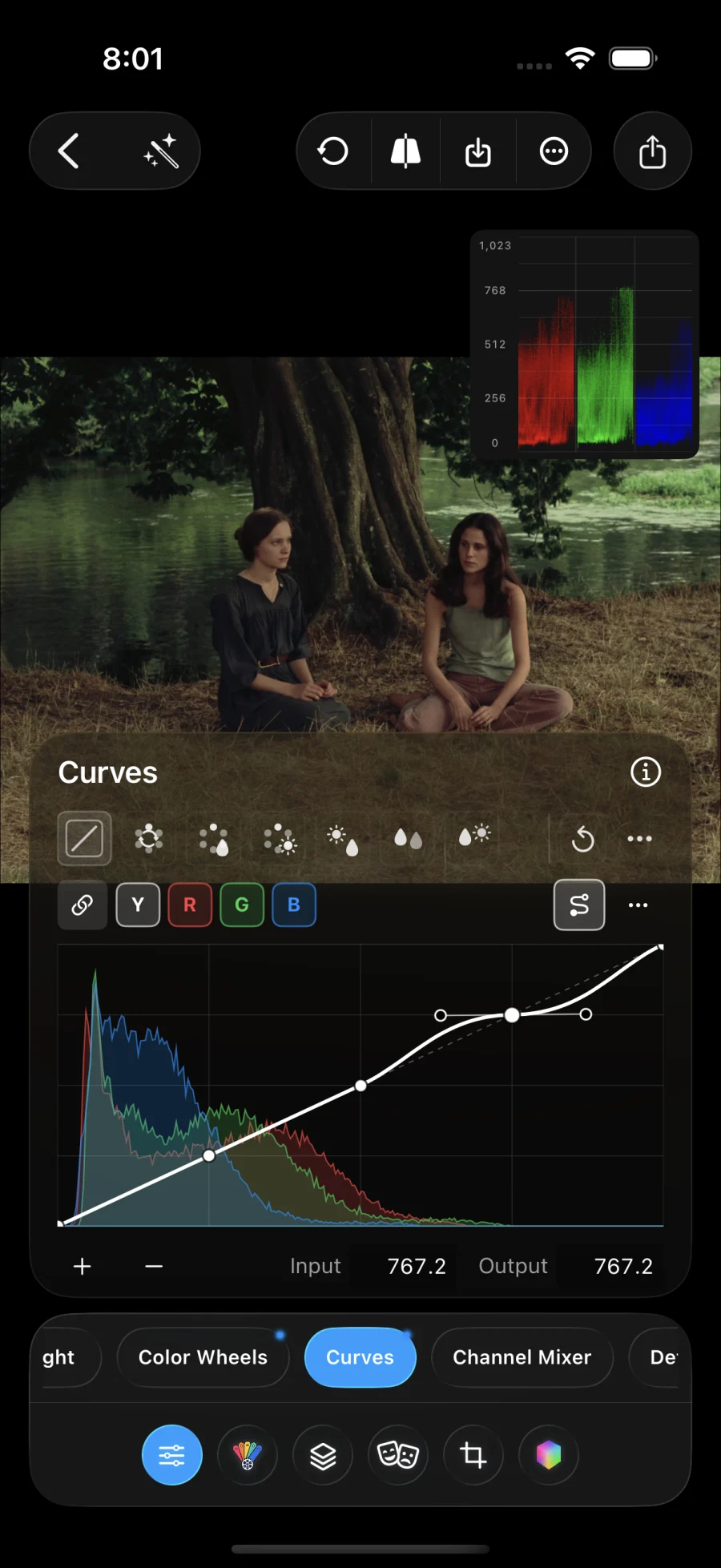
If you know Resolve, the tools will feel familiar:
- Color Space Transform. Set the input to Apple Log, Apple Log 2, ARRI LogC, Sony S-Log3, Fuji F-Log, Panasonic V-Log, RED Log3G10, DJI D-Log, or Insta360 I-Log. Grade in Rec.709 or in DaVinci Wide Gamut with DaVinci Intermediate gamma, then output Rec.709. Tone mapping for log highlights can be switched on or off.
- Color Wheels. Lift, Gamma, Gain, and Offset with a master level for each and a Lum Mix control.
- Curves. A custom curve for Y, R, G, and B, plus six HSL modes: Hue vs Hue, Hue vs Sat, Hue vs Lum, Lum vs Sat, Sat vs Sat, and Sat vs Lum.
- Color Slice and Channel Mixer. Per-color-family hue, density, and saturation, and an RGB mixer with Preserve Luminance and Monochrome.
- Scopes. Luma waveform, RGB waveform, parade, vectorscope, and histogram. You can move the scope around the viewer.
- Masks. Linear, radial, image, draw, and luminance range masks.
- LUTs. Import .cube files and HaldCLUT images, link whole LUT folders, stack LUTs, and control intensity. See our guide to importing .cube LUTs on iPhone.
- Film tools. Grain, halation, bloom, film print emulation, and a three-strip Technicolor-inspired look.
- Export. 10-bit processing, ProRes, HEVC, and H.264 video, stills as HEIC, JPEG, PNG, or TIFF, and the supported color adjustments as a reusable .cube LUT.
What it does not do: PeekLUT has no node graph, timeline, audio tools, or titles. It is the grading step. Cut the graded clips in whichever editor you already use.
Download PeekLUT on the App Store
How Lightroom, VN, and CapCut compare
| App | Built for | Import .cube LUTs | Export .cube LUTs | Log footage |
|---|---|---|---|---|
| PeekLUT | Color grading photos and video | Yes, plus HaldCLUT and folders | Yes | Color space transforms for Apple Log, S-Log3, LogC, and more |
| Adobe Lightroom | Photo editing, light video adjustments | No direct import | No | No log tools |
| VN Video Editor | Timeline editing for social video | Yes, one file at a time | No | Through a conversion LUT |
| CapCut | Templates and fast social edits | Reliable on desktop, varies on iPhone | No | Through a conversion LUT |
Adobe Lightroom
Lightroom is a photo editor first. It has strong masking, presets, and cloud sync for stills. It also opens video, with a reduced toolset: light, color, and preset adjustments on a clip. Adobe's help documentation lists the tone curve as unsupported for video on iOS, and there is no log color management.
The bigger gap for Resolve users is LUTs. Lightroom on iPhone does not import .cube files directly. The usual workaround is to convert a LUT into a profile on a desktop computer and sync it through Creative Cloud, which is slow if you work from a LUT library. It cannot export a .cube either, so a look built in Lightroom stays in Lightroom.
Compared with PeekLUT: Lightroom is the stronger photo library. PeekLUT is the stronger grading tool, and it gives photos and video the same wheels, curves, LUTs, and scopes, so one look can cover both.
VN Video Editor
VN is a timeline editor aimed at short-form video. It cuts multi-clip projects, adds text and music, and exports 4K. For color it imports .cube LUTs as filters, one file at a time, and has an adjustment panel with exposure, temperature, highlights, shadows, and HSL controls.
VN handles Apple Log by applying a conversion LUT. There is no color space transform, no wide-gamut working space, and no way to export a look as a LUT. It is built to finish an edit quickly, not to build a grade.
Compared with PeekLUT: the two do different jobs and work well together. Grade the clips in PeekLUT, export them, then assemble the edit in VN.
CapCut
CapCut is built around templates, captions, effects, and fast social edits. Its Adjust panel includes HSL, curves, and a color wheel. Custom .cube LUT import is dependable in the desktop app. On iPhone the option has come and gone between versions, so check your own build before planning a workflow around it.
Like VN, CapCut treats log footage as something to fix with a LUT, and it cannot export a look as a .cube. Color is one panel among many in an app whose main job is editing.
Compared with PeekLUT: CapCut is where you add captions and cut to music. PeekLUT is where you manage the color space, balance with scopes, build the look, and save it as a LUT you can reuse anywhere.
A Resolve-style workflow on iPhone
Here is how to get a managed grade on Apple Log footage without opening a laptop.
- Shoot. Record Apple Log in ProRes or HEVC. Expose for the highlights.
- Set color management. Open the clip in PeekLUT and turn on Color Space Transform. Choose the Apple Log preset (or Apple Log 2 for iPhone 17 Pro footage), or set it manually: Apple Log input, DaVinci Wide Gamut and DaVinci Intermediate for the timeline, Rec.709 output. This is the same idea as a color managed project in Resolve.
- Balance with scopes. Use Offset and the parade to neutralize the image, then set black and white points with Lift and Gain while watching the waveform.
- Build the look. Shape contrast with a custom curve. Use Hue vs Sat or Color Slice to control one color family, and check skin on the vectorscope.
- Add a LUT only if it helps. If you use a creative LUT, make sure it expects the color space you are feeding it. Do not stack a Log to Rec.709 LUT on top of a color space transform that already did the conversion.
- Finish and export. Add grain or halation last. Export ProRes for an edit or HEVC for sharing.
- Reuse the look. Export the supported color adjustments as a .cube. Load it on a node in Resolve on your desktop, or keep it in PeekLUT for the next shoot. Masks, grain, halation, and bloom cannot live inside a LUT, so export the rendered clip when you need those.
For the full step-by-step method, see our iPhone color grading guide.
Common mistakes
- Trying to sideload Resolve. There is no iPhone build to install. Sites offering a "DaVinci Resolve iPhone download" or an IPA file are not from Blackmagic and should be avoided.
- Converting log footage twice. One transform or one conversion LUT, not both.
- Grading by eye at low screen brightness. Turn off True Tone and Night Shift, set a consistent brightness, and trust the scopes.
- Expecting a LUT to carry everything. A 3D LUT stores a color transform. It cannot store masks, texture, or glow.
- Grading inside a timeline editor. Editors are built to cut. Grade first in a color app, then edit the graded clips.
Frequently asked questions
Is there a DaVinci Resolve app for iPhone?
No. As of September 2026, DaVinci Resolve is available for Mac, Windows, Linux, and iPad. Blackmagic Design has not released or announced an iPhone version. For Resolve-style color grading on an iPhone, use a dedicated grading app such as PeekLUT.
Can I install DaVinci Resolve for iPad on an iPhone?
No. DaVinci Resolve for iPad is listed as an iPad-only app, so it does not appear in the App Store on iPhone and cannot be installed there.
What is the closest app to DaVinci Resolve on iPhone?
For color grading, PeekLUT is the closest. It has Lift, Gamma, Gain, and Offset wheels, custom and HSL curves, waveform, parade, and vectorscope scopes, color space transforms with a DaVinci Wide Gamut working space, masks, and .cube LUT import and export.
Can I move a grade from my iPhone into DaVinci Resolve?
Yes. In PeekLUT you can export the supported color adjustments as a .cube LUT and apply it in Resolve. Effects that depend on position or neighboring pixels, such as masks, grain, halation, and bloom, are not part of a LUT, so export the rendered clip when you need them.
Can I color grade Apple Log footage on iPhone without Resolve?
Yes. PeekLUT includes Apple Log and Apple Log 2 color space transform presets that convert the footage through a DaVinci Wide Gamut working space to Rec.709. You can then grade with wheels, curves, and scopes and export ProRes or HEVC.
Is Lightroom a good replacement for DaVinci Resolve on iPhone?
Not for video. Lightroom is a photo editor that offers a reduced toolset for clips. On iPhone it does not import .cube LUTs directly and has no log color management.
Are VN or CapCut good replacements for DaVinci Resolve on iPhone?
They replace the editing side, not the color side. Both are timeline editors for social video. They handle log footage with a conversion LUT and cannot export a look as a .cube. Many people grade in PeekLUT first, then cut the graded clips in VN or CapCut.
All product names are trademarks of their respective owners. PeekLUT is an independent app by Lauper Labs and is not affiliated with or endorsed by Blackmagic Design, Adobe, or the makers of VN or CapCut.
PeekLUT
Color grading for iPhone and iPad